Blog
Microsoft Office LTSC 2024 Standard – Buy & Activate in UAE | Softwarekey.ae

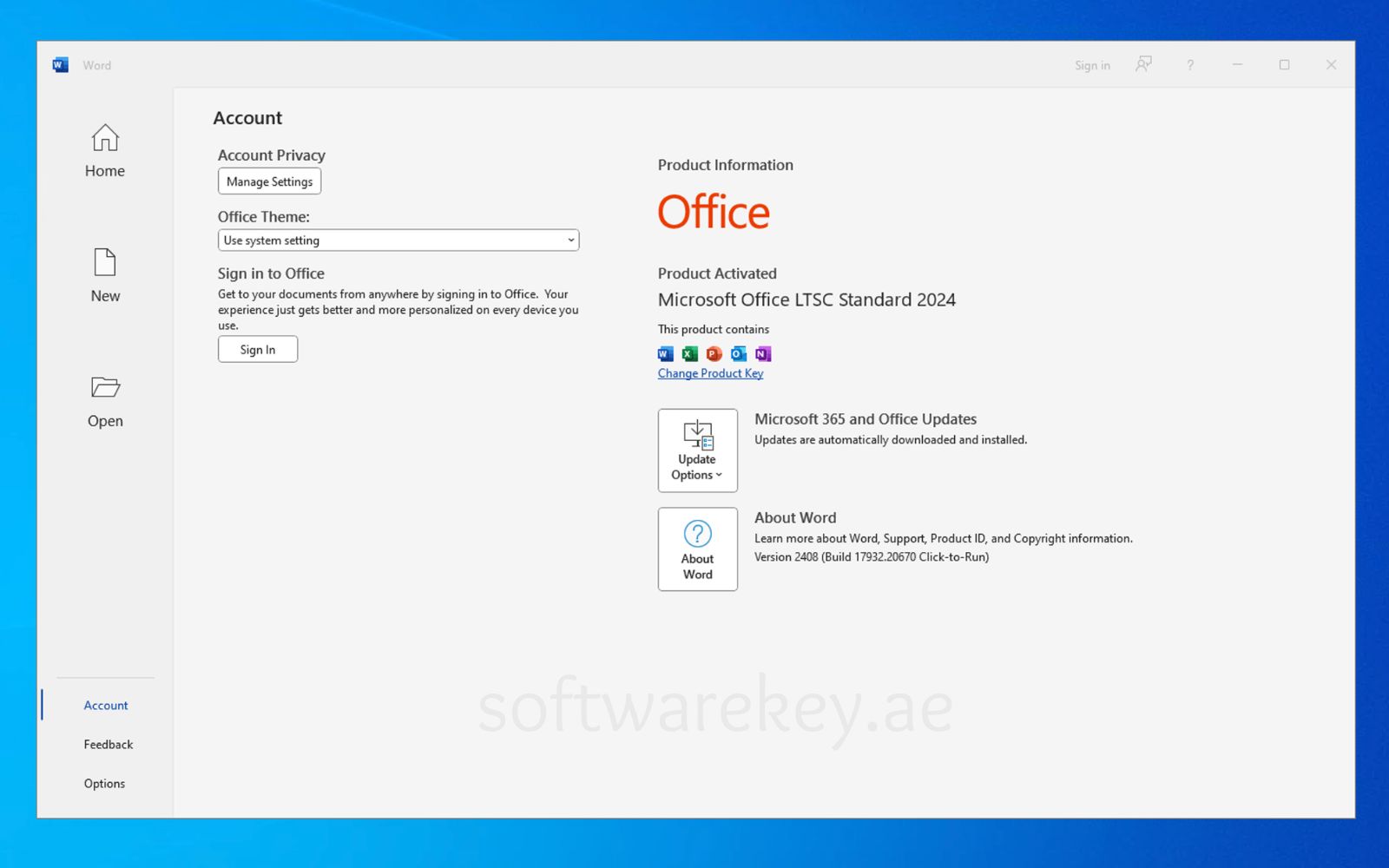
If you are searching for Microsoft Office LTSC 2024 Standard in UAE, this complete guide will help you download, install, and activate your license correctly.
At Softwarekey.ae, we provide genuine Microsoft Office LTSC 2024 Standard product keys for businesses, professionals, and organizations across Dubai, Abu Dhabi, Sharjah, Ajman, and the entire UAE.
What is Microsoft Office LTSC 2024 Standard?
Microsoft Office LTSC 2024 Standard is designed for companies that need stable, long-term Office applications with a one-time payment model.
It includes the classic desktop apps:
- Microsoft Word 2024
- Microsoft Excel 2024
- Microsoft PowerPoint 2024
- Microsoft Outlook 2024
Unlike Microsoft 365, this version does not require a monthly subscription. It receives security updates but no feature changes — making it ideal for corporate and government environments in the UAE.
Why Buy Office LTSC 2024 in the UAE?
✔ One-time purchase – No recurring subscription
✔ Ideal for UAE businesses & corporate offices
✔ Suitable for government and enterprise environments
✔ Works fully offline after activation
✔ Lifetime validity (for one device)
Many UAE companies prefer LTSC because it ensures stability and compliance without forced feature updates.
System Requirements – Windows PC (UAE Users)
Before installation, ensure your device meets these requirements:
| Requirement | Details |
|---|---|
| Operating System | Windows 10, Windows 11, Windows Server 2019 / 2022 / 2025 |
| Processor | 1.6 GHz or faster, Dual-Core (64-bit) |
| RAM | 4 GB or more |
| Storage | Minimum 4 GB free space |
| Display | 1280 × 768 resolution |
| Internet | High-speed broadband recommended |
| Graphics | DirectX 9 or later with WDDM 2.0 |
⚠️ Not compatible with macOS.
How to Install Microsoft Office LTSC 2024 Standard
Step 1: Remove Old Office Versions
To prevent activation errors:
- Open Control Panel
- Click Programs and Features
- Select old Microsoft Office version
- Click Uninstall
- Restart your PC
Step 2: Install Using One-Click Setup (Recommended for UAE Customers)
After purchasing from Softwarekey.ae:
| Language | 64‑bit | 32‑bit |
|---|---|---|
| Deutsch | Herunterladen | Herunterladen |
| English | Download | Download |
| Français | Télécharger | Télécharger |
| Italiano | Scarica | Scarica |
| Español | Descargar | Descargar |
- Download the installation file
- Right-click → Run as Administrator
- Wait for installation to complete
- Open Word or Excel
- Enter your product key
- Activate
To check or change your product key:
- Open Word → File → Account
Advanced Installation via Office Deployment Tool (IT Professionals)
For IT administrators in Dubai, Abu Dhabi, and Sharjah, follow the official deployment method.
Step 1: Download Office Deployment Tool
Create a folder:
| C:\Office2024Setup |
Extract the Office Deployment Tool files into that folder.
You should see:
- setup.exe
- Sample XML files
Step 2: Create configuration.xml
Open Notepad and paste:
| <Configuration> <Add OfficeClientEdition=”64″ Channel=”PerpetualVL2024″> <Product ID=”Standard2024Volume” PIDKEY=”XXXXX-XXXXX-XXXXX-XXXXX-XXXXX”> <Language ID=”en-us” /> </Product> </Add> <RemoveMSI /> <Display Level=”None” AcceptEULA=”TRUE” /> <Property Name=”AUTOACTIVATE” Value=”1″ /> </Configuration> |
Replace XXXXX with your genuine product key.
Save as:
- configuration.xml
- Save type: All Files
- Encoding: UTF-8
- Inside: C:\Office2024Setup
Step 3: Install via Command Prompt
Open Command Prompt as Administrator and run:
| cd C:\Office2024Setup |
Then:
| setup.exe /configure configuration.xml |
⚠ Installation runs silently in background.
Installation is complete when:
- Office apps appear in Start Menu
- Word and Excel open successfully
Step 4: Telephone Activation (If Required)
- Open any Office app
- Choose activation by telephone
- Call the number displayed
- Enter Confirmation ID
Activation complete — No Microsoft account required.
Frequently Asked Questions (UAE)
1. Is this a lifetime license?
Yes. It is a one-time purchase license valid for one PC.
2. Can I activate with Microsoft account?
No. It uses volume license activation (key or telephone).
3. Is it suitable for UAE corporate use?
Yes. It is ideal for businesses, enterprises, and government offices.
4. What is the difference between Standard and Professional Plus?
Standard includes Word, Excel, PowerPoint, and Outlook.
Professional Plus includes additional apps like Access.
5. Does it work offline?
Yes. After activation, it works completely offline.
Why Buy from Softwarekey.ae?
If you are searching for:
- Office LTSC 2024 Standard UAE
- Buy Microsoft Office 2024 Dubai
- Office 2024 product key Abu Dhabi
- Genuine Office license Sharjah
- Microsoft Office lifetime license UAE
Softwarekey.ae offers:
✔ Instant digital delivery
✔ Genuine activation keys
✔ UAE-based customer support
✔ Secure payment methods
✔ Fast activation assistance


 Windows 11
 Windows 10
 Windows 8
 Windows 7
 Windows XP
 Microsoft 365
 Office 2021
 Office 2019
 Office 2013
 Office 2010
 Project 2019
 Project 2016
 Visio 2019
 Visio 2016
 Windows Server
 SQL Server
 SQL Server 2022
 Jetbrains
 Mcafee
 Avast
Avast AVG
AVG